

Overview of Public Search
- Specific influencer search - Search for a single specific profile to access their Mediakit with estimated data.
- Keyword search - Search for a single word or sentence as a whole. Sheer will only show influencers if there is a match with the keywords in the influencers bio or captions of their posts.
- Audience filters - Search based on the audience data of your desired influencer, such as age groups, location, interests, etc.
- Influencer filters - Search based on the influencers data, such as following size and country.
- Other filters - Additional filters applied to further narrow your results, such as excluding business accounts.
- Shortlist filters - How to use shortlists in Public Search to your advantage.
- Good to know features - quick tips to optimize your use of Public Search
Specific influencer search
To find a single specific creator to access their Mediakit with estimated data, use the @ sign in conjunction with the creators handle. For example, to find Rasmus Brohave’s profile in Public Search, simply search for @rasmusbrohave in the keyword bar: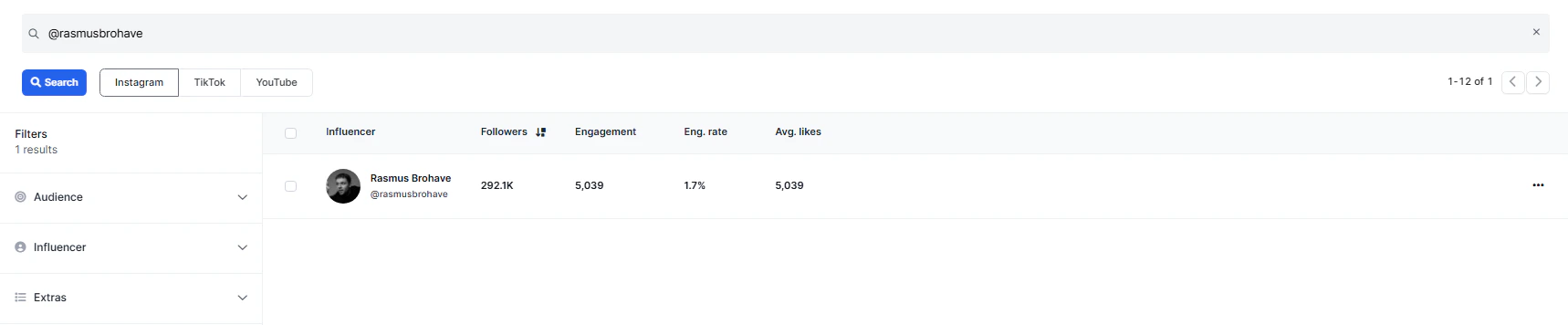
Keyword search
A keyword search allows you to find influencers by searching for a specific word or an exact sentence. Sheer scans the influencer’s bio and captions of their posts to identify relevant matches. Influencers will only appear in the results if the keyword or phrase is found in their bio or post captions on mimimum one instance, ensuring that the profile results are directly related to your search.Audience filters
Filter by the influencer’s followers by applying a minimum percentage requirement for each specific filter.- Age Groups - Filter for audiences within specific age brackets.
- Gender - Filter audiences by male or female.
- Location - Filter influencers by the top countries where their audience resides.
- Language - Identify influencers whose audiences primarily speak a particular language. This filter is recommended if the location filter results in too many English speaking audiences.
- Audience Interests (IG only) - Filter by audience interests such as fashion, fitness, family, gaming, travel, and more.
Influencer filters
Filter specifically for the desired influencer.- Influencer size - Filter by the size of the influencer’s following.
- Influencer average views - Filter by the average views of the profile. Average views are calculated based on the 10 most recent posts.
- Influencer age - Filter by the influencers age in age ranges. This data is an estimate, so disable if your search provides too narrow results.
- Gender - Filter by influencer gender.
- Location - Filter by influencer’s country of origin.
- Note: Larger cities may also be applied to influencer location in case your campaign is geographical specific within a country.
- Profile language - Filter for the language the influencer uses on their profile. Apply only if the Location filter does not provide the desired local result.
- Last post date - Filter influencers by their most recent activity, ensuring only active profiles show up in your search.
Other filters
These additional filters help clean up your search results by removing non-relevant or ineligible profiles.- Exclude business account (IG only) - Removes majority of brand or company-run profiles.
- Exclude private account - Filters out profiles that are not publicly viewable.
- Has sponsored posts (IG Only) - Only discover profiles who have previously published sponsored content on their profile using the platform specific “paid partnership” features.
Good to know tips for Public Search
- Enabling “open socials” for multiple creators at once - You may select multiple creators in the search tab and open all their social profiles with the click of a simple button. This requires allowing “pop up windows” in your browser for Sheer.
- Note for TikTok: TikTok may flag you for opening too many profiles at once and provide a 5 minute timeout on the website. Limit to opening 6 profiles at most to avoid receiving a timeout. This is not an issue with Instagram.
Find - tips & tricks
Access third-party creator data when browsing their TikTok or Instagram account directly in the browser.