

- Verified Search - Influencers who have connected their Instagram and TikTok accounts to Sheer. This gives you access to first-party insights provided directly from Meta and Tiktok.
- Public Search - browse millions of publicly available influencer profiles using estimated metrics.
- Shortlists - Easily create, manage and export lists of influencers for your specific needs directly in Sheer, and how to use them during your influencer search.
- Sheer’s Browser Extention - Access the creators data when browsering their TikTok or Instagram account in browser.
Verified Search ✅
Search between thousands of verified profiles on both TikTok and Instagram. Use Verified Search to confirm your creator is signed up on Sheer and verify their data matches your campaign strategy by accessing their Media kit. Sheer Media kit preview: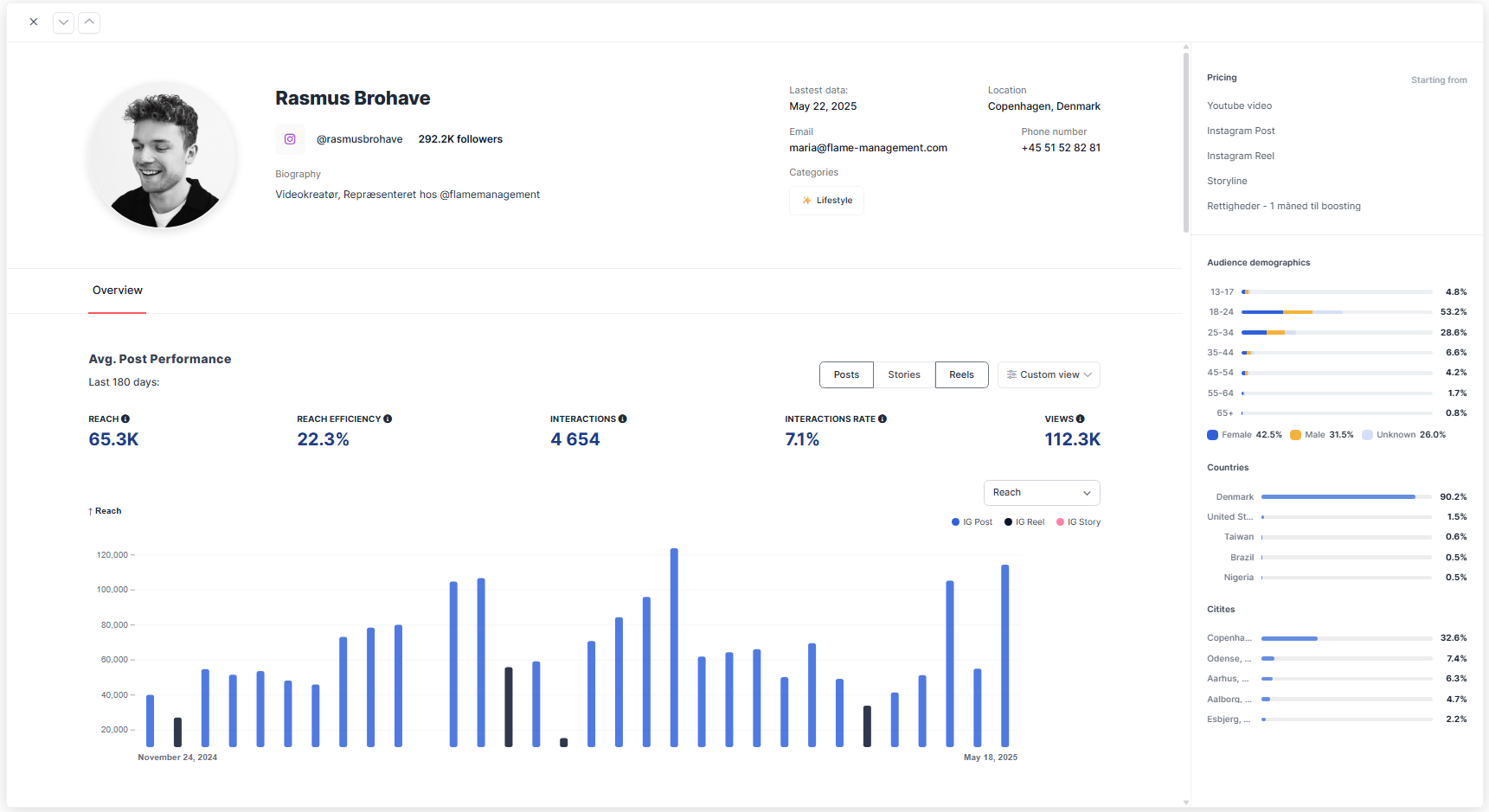
Public Search 🔎
Public Search is a discovery tool that gives you access to one of the largest influencer databases available with nearly 400 million profiles across Instagram and TikTok, plus over 11 million on YouTube. Using filters for both influencer and audience data, you can tailor your search to your campaign goals. Specific influencer Search - To find a single creator to get an estimate of their audience data, use the @ sign in conjunction with the creators handle. Overview available filters for Public Search:- Keyword Search - Search for a single word or sentance as a whole. Sheer will only show influencers if there is a match to the keywords in the influencers bio or captions of their posts.
- Audience filters - Search based on the audience data of your desired influencer, such as age groups, location, interests, etc.
- Influencer filters - Search based on the influencers data, such as following size and country.
- Other filters - Additional filters applied to further narrow your results, such as excluding business accounts.
- Shortlist filters - How to use shortlists in Public Search to your advantage.
- Age Groups - Filter for audiences within specific age brackets.
- Gender - Filter audiences by male or female.
- Location - Filter influencers by the top countries where their audience resides.
- Language - Identify influencers whose audiences primarily speak a particular language. this filter is recommended if the location filter results in too many English speaking audiences.
- Audience Interests (IG only) - Filter by audience interests such as fashion, fitness, family, gaming, travel, and more.
- Tip: Influencer audiences are a reflection of the influencer themselves. As such, audience interest can also be a powerful tool to find influencers who engage in specific interests on their profile.
- Influencer Age - Filter by the influencers age in age ranges. This data is an estimate, so disable if your search provides too narrow results.
- Gender - Filter by influencer gender.
- Location - Filter by influencers country of origin.
- Note: Larger cities may also be applied to influencer location in case your campaign is geographical specific within a country.
- Profile Language - Filter for the language the influencer uses on their profile. Apply only if the Location filter does not provide the desired local result.
- Last Post Date - Filter influencers by their most recent activity, ensuring only active profiles show up in your search.
- Exclude Business Accounts (IG only) - Removes majority of brand or company-run profiles.
- Exclude Private Accounts - Filters out profiles that are not publicly viewable.
- Only Include Profiles with Sponsored Posts (IG Only) - Only discover profiles who have previously published sponsored content on their profile using the platform specific “paid partnership” functions.
Shortlists 📋
Shortlists are customizable, self-managed influencer lists in Sheer that help you keep track of creators of special interest, future collaborations, or specific campaigns. They can both be created and managed within Sheer. Why create a Shortlist? Head to the Shortlists tab and create a new list. We recommend creating a list prior to starting your influencer Search to continiously add influencers that matches your interest. Shortlists can be used to your advantage during your Public Search, and can later be exported to Excel for an easy overview. How Shortlists Work in Public Search:- Exclude Shortlist Profiles from your Public Search - By default, adding a Shortlist as a filter excludes those profiles from your current search results. This is ideal for:
- Preventing profiles you’ve already reviewed as a great fit from reappearing in future searches.
- Hiding influencers you’ve ruled out from reappearing in future searches.
- Search Only Within a Shortlist - You can also search only within a specific Shortlist.
- You want to search through shortlists using new filters, thereby only seeing influencers from previously saved shortlists.
- You’re preparing a marketing activity using handpicked profiles and want to refine them further.
Sheer Browser Extension 🌐
View influencer analytics and manage shortlists directly while browsing profiles. Instantly view accurate influencer and audience analytics while browsing profiles, right inside your browser. Whether you’re scouting for your next collaboration or refining your campaign strategy, the Sheer Chrome Extension brings your influencer data directly to you, streamlining research and decision-making without leaving the page.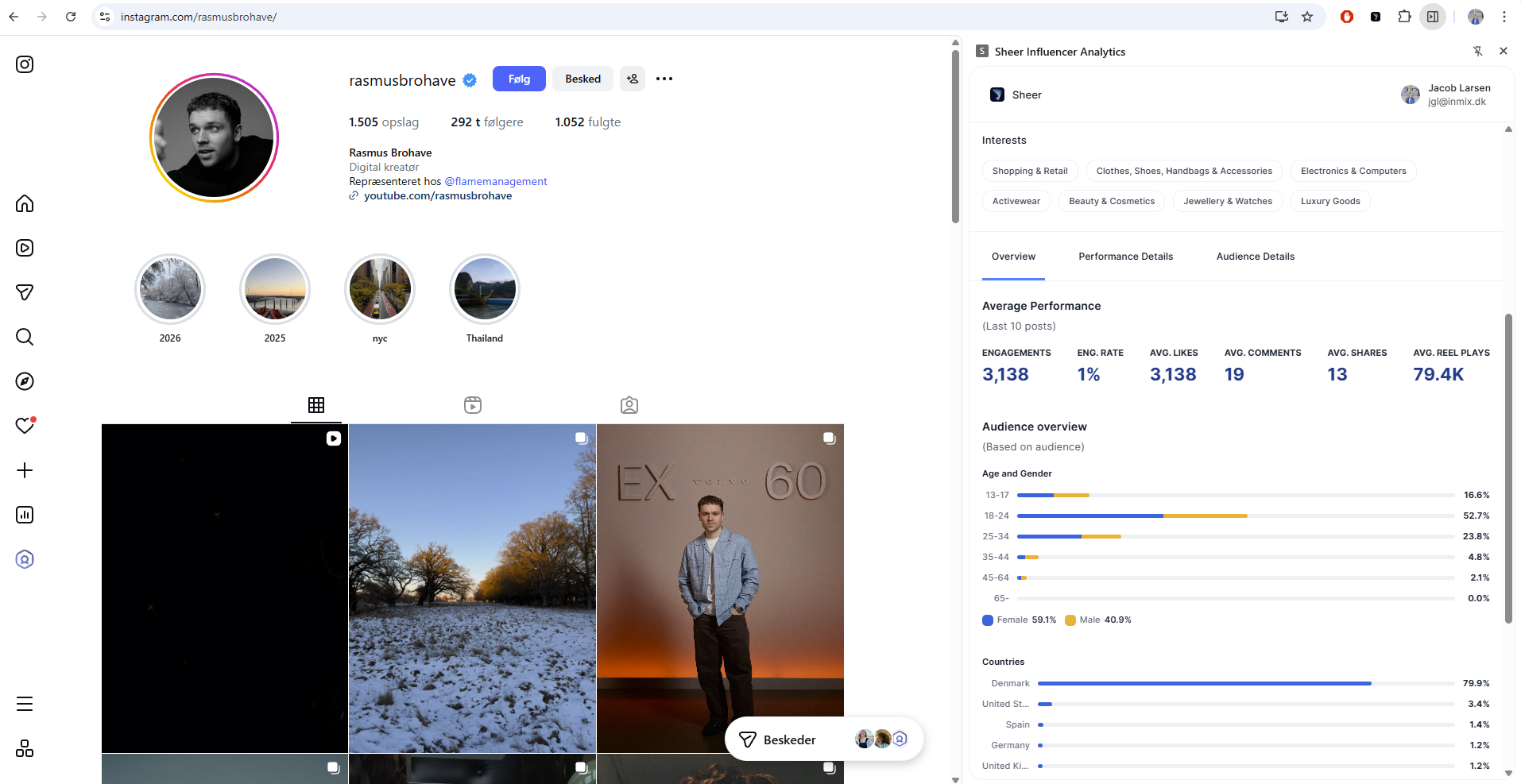
- 1️⃣ Install the Sheer Chrome Extension Here.
- 2️⃣ Log in with your licensed Sheer account.
- 3️⃣ Browse profiles as usual — open the extension to view real-time analytics and add creators to your shortlists.