

Verified Search ✅
Search between thousands of verified profiles on both TikTok and Instagram. There are two primary uses for Verified Search in Sheer:- Use Verified Search to confirm your creator is signed up on Sheer.
- Validate that influencer data matches your campaign strategy by accessing their Mediakit.
Mediakits
Creator Mediakits provide an in-depth look into each individual creator’s audience data & historic performance. For verified profiles, influencer data is first-party data directly from Meta or TikTok. Below is a preview of a Mediakit from the creator Rasmus Brohave: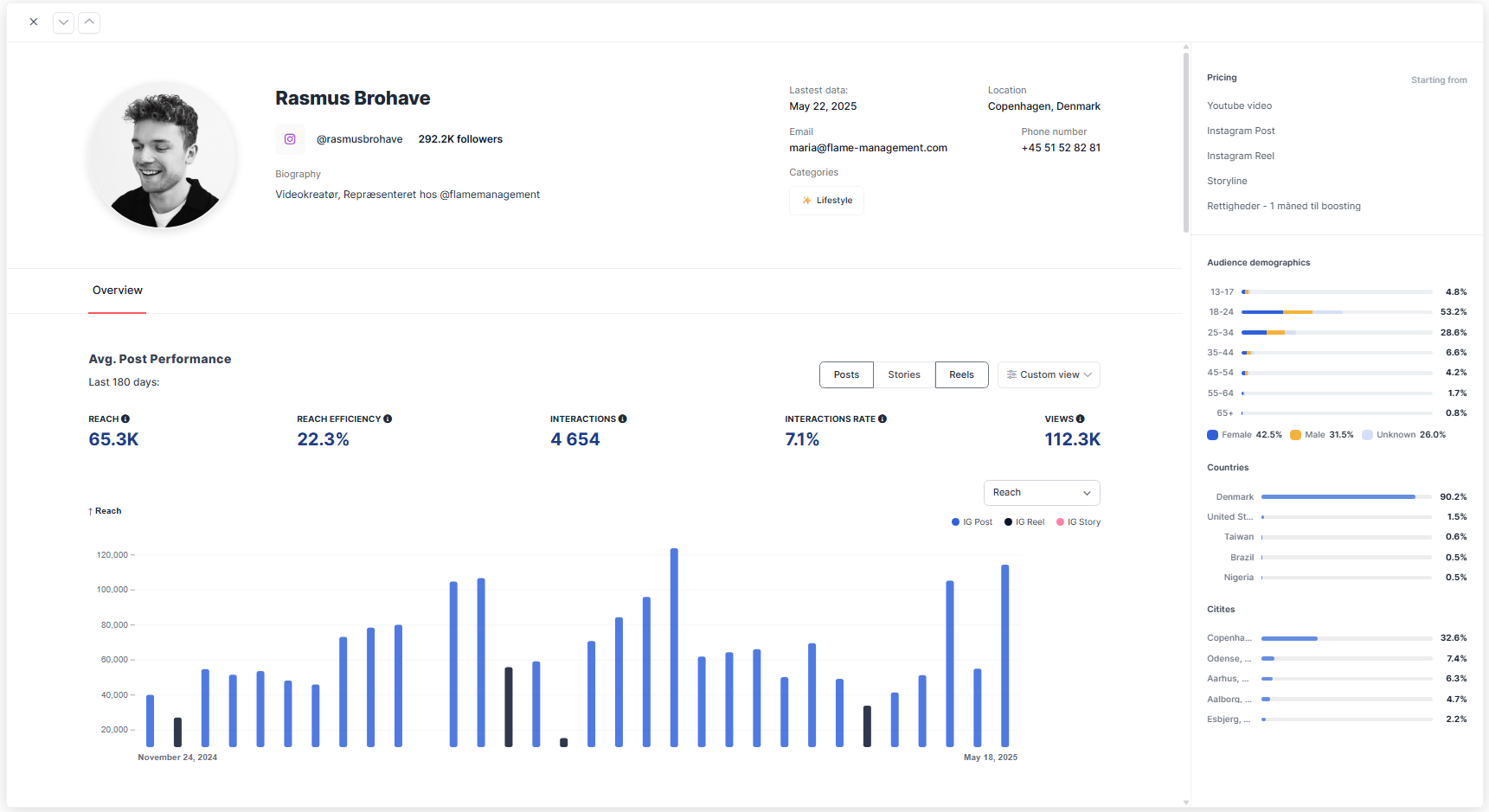
- Follower audience vs. engaged audience demographics - View details of the creator’s audience with age groups, gender, country, and top five cities either by the creator’s follower audience or engaged audience
Tip! While follower audience gives you a clear indication of who follows the creator, engaged audience provides more details in the direction that the platforms algorithm pushes the content.
- Average post performance - A detailed overview of a creator’s average post performance over the past 180 days. For Instagram, you can choose to analyze performance by Posts, Stories, or Reels, while TikTok simply provides overall performance.
- Sponsored vs. non-sponsored posts - An important tool to directly compare how the influencer performs in day-to-day content versus paid brand collaborations.
- Blue text shows the performance of normal (organic) content
- The number below shows the benchmark for paid collaborations. You can also go to “Custom View” and enable the “Sponsored” toggle to view performance only for sponsored posts.
- Sponsored vs. non-sponsored posts - An important tool to directly compare how the influencer performs in day-to-day content versus paid brand collaborations.
- Reach - The average number of unique accounts that viewed the content. This helps gauge the creator’s ability to consistently get their content in front of people.
- Reach Efficiency - How well the influencer converts their follower base into actual viewers. It’s calculated as Reach divided by Follower Count, expressed as a percentage. A higher Reach Efficiency means the influencer’s content is regularly seen by a large portion of their audience.
- Interactions - The average number of engagements per post such as likes, comments, saves, shares.
- Interaction Rate - Interactions divided by Reach, offering a normalized metric that compares creators of different sizes on an even playing field.
- Views - The total number of times the content was viewed, also known as impressions.
What to look for when validating an influencer for a data-driven decision
Key indicators to look for in a creator’s Mediakit depends on the campaign objective and audiences you want to expose your brand to, however, they are key indicators to consider for a data-driven decision.- Reach Efficiency This metric combines an influencer’s audience size and content performance, making it easy to compare influencers of different sizes.
- An influencer’s Reach Efficiency can vary depending on content type (posts, Reels, Stories, TikTok videos). Always compare the same content format to get accurate insights.
- Audience Demographics Understanding an influencer’s audience is crucial because early engagement affects how widely content is distributed by the platform’s algorithm. Key indicators of high-performing audiences include:
- High percentage of female followers
- Majority aged 18–34 (TikTok often performs best with 18–24)
- Predominantly native followers in the country the influencer communicates in. Pro tip: Ensure the influencer’s audience aligns with your target market. Many brands look for 65–70%+ alignment in demographics such as country, age, and gender when validating a profile to ensure quality across the board.
- Sponsored vs. non-sponsored posts A highly underrated tool for making sure a profile actually performs as expected for sponsored posts:
- Performance may differ between sponsored content and an influencer’s usual organic posts.
- Check if sponsored posts maintain strong engagement; large drops in performance could indicate a less effective collaboration.
- Consider taking the influencers sponsored vs. non-sponsored performance into account during negotiations when finalizing brand deal agreements.